




Koring Launcher
项目简介
Koring Launcher 是一款面向 Minecraft 玩家的现代化桌面启动器,目标是把「装得上、启动得起来、出了问题看得懂」做成默认体验。
它围绕实例组织游戏:你可以把不同版本、不同模组加载器与不同模组组合拆成彼此独立的实例,自由切换、分别配置;启动器会在启动前核验版本与依赖是否完整,缺什么就补什么,而不是把一个「半成品」送进游戏。界面采用无边框窗口与玻璃质感设计,配合启动动画、页面转场与深浅色主题,尽量让日常操作保持轻快。
同时,启动器提供了一套面向发布与安全的配套能力:双通道自动更新、设备校验与版本激活、运行公告、崩溃分析、任务队列与反馈入口,让「使用」和「维护」都有明确路径。
当前状态:主线版本 1.2.7,Windows / macOS / Linux 安装包由 GitHub Actions 统一构建发布。启动、实例管理、崩溃分析、资讯、设置与自动更新等核心能力已可用;资源中心、联机与部分账号入口仍在完善中,详见 项目状态与路线图。
功能一览
启动与运行
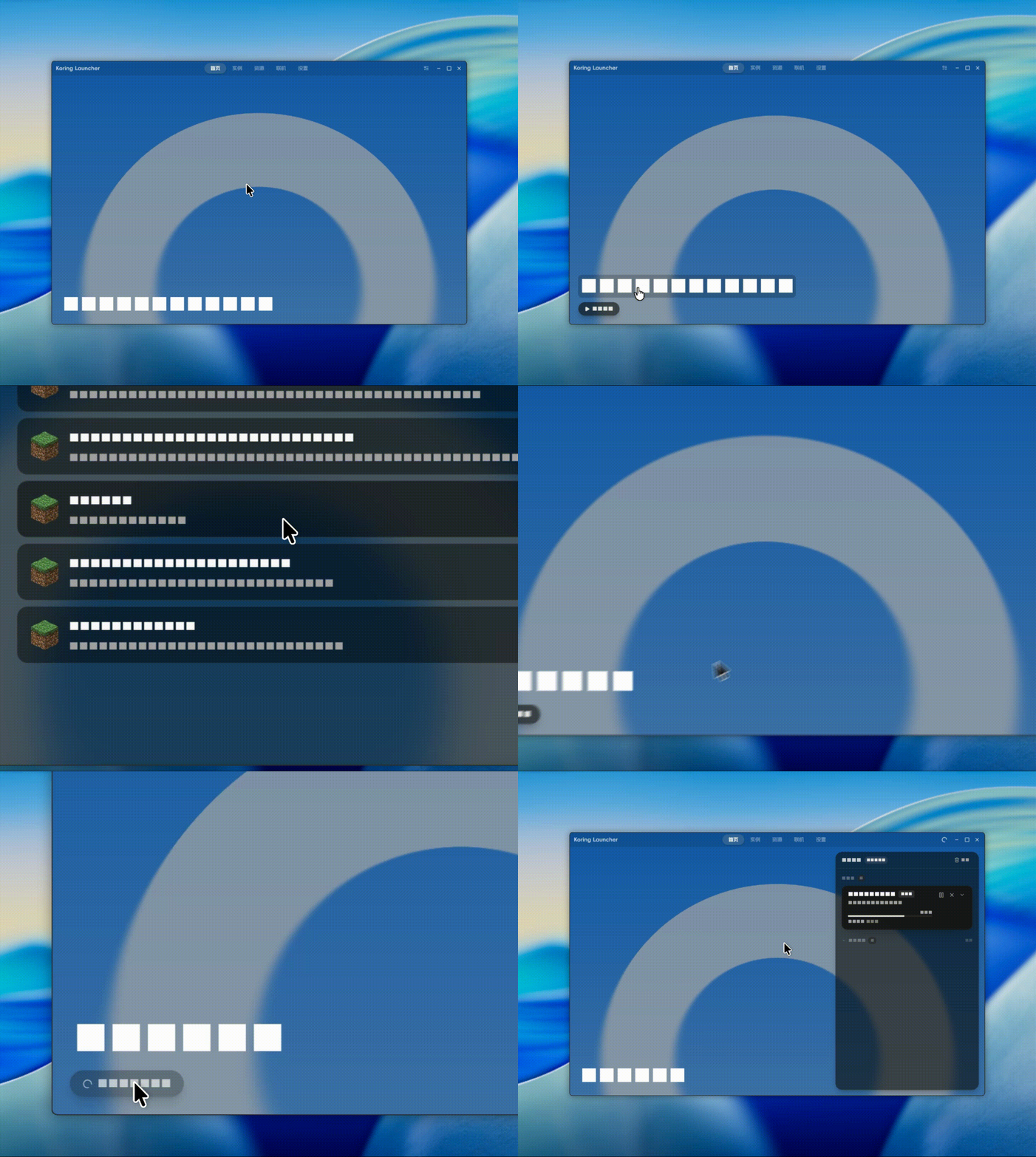
- 首页一键启动:在实例页选中一个版本后,首页标题与启动按钮都会跟随该版本;未选择版本时会引导你前往实例管理,避免「点了没反应」。
- 可启动性优先:启动前会解析启动方案并检查版本文件、客户端 JAR 与依赖库;缺失时明确提示原因,并提供一键补全,而不是带着残缺依赖启动。
- Java 自动匹配:按 Minecraft 版本推算所需 Java 大版本并匹配本机环境,也可手动指定路径、扫描本机 Java,或调整初始内存、最大内存、GC 与额外 JVM 参数。
- 启动参数集中管理:游戏窗口大小、快速进服地址、IP 协议偏好、游戏参数、启动前命令与「启动后启动器如何处理」都可以在设置里统一配置,并在实例级覆盖。
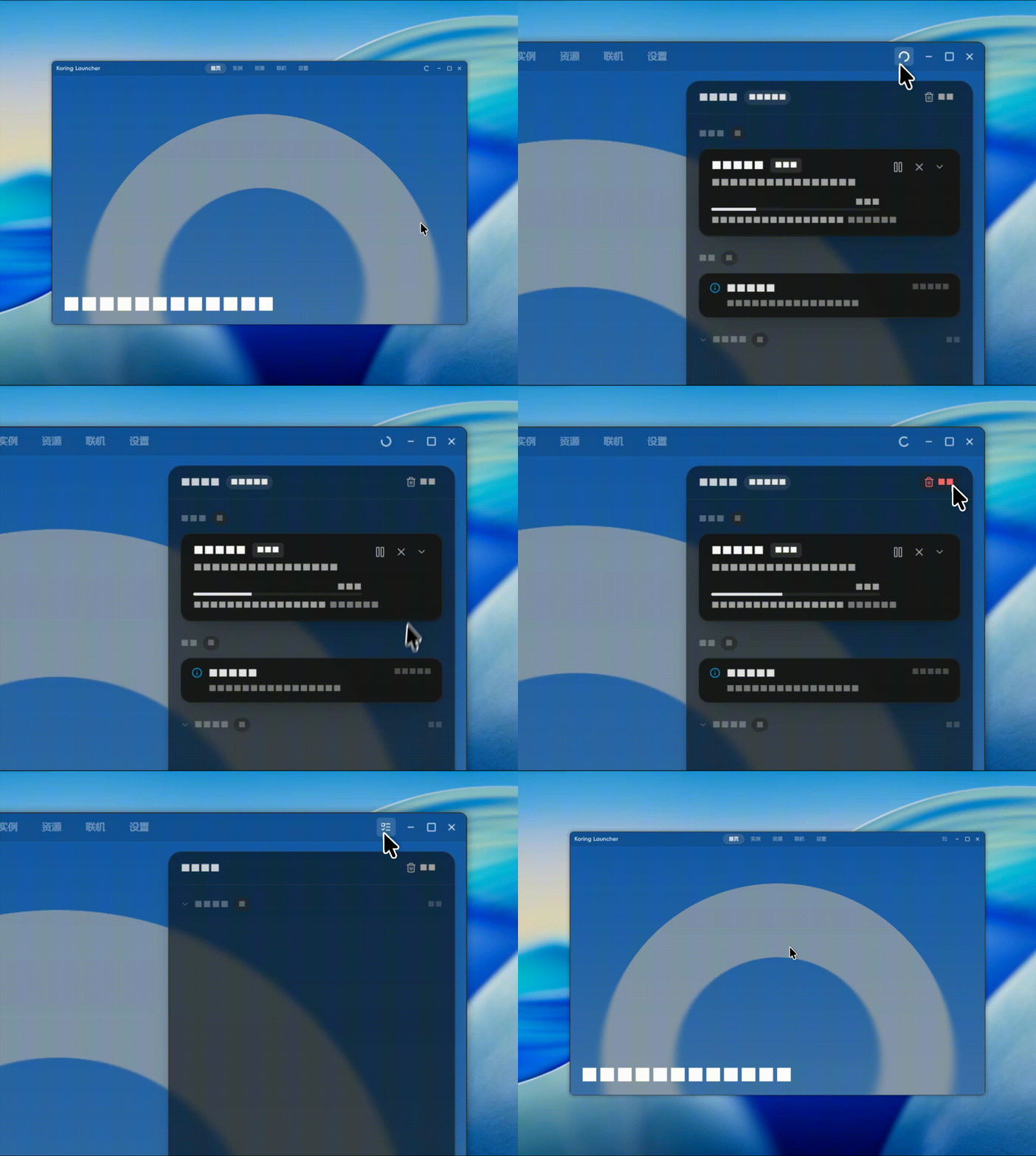
- 运行任务可见:安装、补全与下载统一进入任务队列,支持进度、阶段计数、日志查看、暂停、继续、取消、重试与移除。
实例管理
- 多游戏目录:可添加多个
.minecraft目录,为目录设置显示名、调整顺序,并在目录之间快速切换。 - 新建实例向导:选择 Minecraft 版本与加载器(Forge / NeoForge / Fabric / Quilt / OptiFine)、安装位置与内存,支持创建后立即下载游戏文件。
- 导入已有版本:选择已有游戏目录即可自动识别游戏根目录,并批量导入其中可用的版本,已导入的版本会自动跳过。
- 实例详情:概览、设置、模组、存档、截图、资源包与日志七个页签,集中展示启动版本、加载器、资源根、游玩时长与最近游玩时间等信息。
- 本地内容管理:
- 模组:搜索、按启用状态筛选、单个或批量启用 / 禁用 / 删除,读取模组名与版本;
- 存档:查看图标、世界名称、大小与时间,支持备份、删除与打开目录;
- 截图:缩略图网格预览,可打开或删除;
- 资源包 / 光影包:识别启用状态,快速查看与打开目录。
- 体检与修复:随时检查实例完整性,一键补全缺失的原版文件、加载器与依赖库。
- 版本隔离:设置 → 游戏可切换 PCL2 式三档隔离(隔离到实例目录 / 隔离到版本目录 / 不隔离),决定 mods、存档与配置的落盘位置;切换档位不会搬动已有文件。
- 收藏与选中:标记常用实例,选择后由首页负责启动,实例页只负责管理,职责清晰。
崩溃分析与日志
- 日志页签会自动分析实例的崩溃报告与最新日志,给出 一句结论 + 证据 + 建议 + 环境信息 + 日志尾部。
- 内置二十余条常见原因规则,覆盖内存不足、Java 版本不匹配、模组冲突、缺少前置、Mixin 注入失败、加载器错误、OpenGL / 显卡驱动问题、文件校验失败与权限问题等。
- 没有命中规则时也会给出兜底排查建议,避免只看到一堆原始日志。
安装与下载
- 支持原版、Forge、NeoForge、Fabric、Quilt 与 OptiFine 的组合安装与补全。
- 内置 BMCLAPI 镜像、Mojang 官方源与自定义镜像三种下载源,可调整并发线程数,并在设置页预览实际生效的资源地址。
- 下载源切换即时生效,无需重启启动器。
账号与安全服务
- Koring 账户:扫码登录能力已接入,用于同步个人资料与账户信息(设置入口暂时隐藏)。
- 离线账户:按规范离线 UUID 生成身份,适合离线或局域网游戏。
- LittleSkin:使用皮肤站用户名与密码登录。
- 微软正版账户:登录核心已接入,界面入口仍在完善中。
- 设备校验:首次启动与版本更新后会进行设备登记与状态校验;设备异常时进入独立的阻断页,并提供重试与状态说明。
- 版本激活:启动前校验当前版本是否允许使用;服务端可下发禁激活、强制升级与运行公告。
- KoringDevice 服务:可启用第三方认证服务地址,用于离线服务器等场景。
- 设备识别码:关于页展示基于硬件指纹生成的设备标识,便于问题排查与设备管理。
资讯
- 内置 Minecraft 官方资讯流,按 Java 版、基岩版、地下城、传奇等平台筛选。
- 自动加载下一页、滚动到底继续加载,并支持手动刷新;点击卡片可在系统浏览器中打开官方原文。
桌面体验与个性化
- 无边框窗口、自绘毛玻璃标题栏与窗口控制,深浅色主题自动适配。
- 独立启动画面与启动过渡,页面之间使用带方向的转场动画;版本卡片带有动态丝绸质感。
- 背景支持颜色、渐变、图片、模糊、不透明度与视差效果;自选壁纸会按屏幕尺寸优化后本地保存,并以资源引用方式读取,避免大图长期占用内存。
- 辅助功能提供减少动画、减少透明度与高对比度选项;界面语言可选简体中文 / English(文案本地化仍在推进)。
设置中心
设置按用途分组,常用项包括:
- 主页:版本卡片、更新入口与常用设置快捷入口;
- 游戏:启动器行为、窗口大小、快速进服、IP 协议偏好;
- 游戏账户与档案:账号管理与游戏档案;
- Java 虚拟机与内存:自动 / 手动 Java、扫描、内存分配、锁定内存、GC 与 JVM 参数;
- 游戏目录:自动查找、目录显示名、排序与共享资源目录;
- 高级设置:游戏参数尾部、启动前命令、调试模式与危险区重置;
- 主题与背景、主界面、语言、辅助功能;
- 下载、以太联机、陶瓦联机、KoringDevice 服务;
- 关于、版权、服务与反馈、赞助我们,以及由服务端控制的开发者选项。
首次启动与更新引导
- 首次启动进入 OOBE:语言 → 设备校验 → 产品协议 → 法律信息 → 欢迎 → 当前版本 → 关于此版本 →(测试版需签署 Beta 协议)→ 版本激活 → 完成。
- 版本更新后进入 UPVP 引导,重新完成设备校验、查看更新内容与版本激活,再回到游戏。
- 「关于此版本」会把发布说明按新增 / 修复 / 优化等类别做成卡片,便于快速了解改动。
界面预览
<!-- 示例: <img src="docs/screenshots/home.png" width="720" alt="主界面" /> -->截图整理中 —— 欢迎将截图放入
docs/screenshots/后在此展示。
下载与安装
从 GitHub Releases 下载最新安装包:
| 平台 | 安装包 | 说明 |
|---|---|---|
| Windows | NSIS 安装程序 | 可自选安装目录,创建桌面与开始菜单快捷方式 |
| macOS | DMG / ZIP | 同时提供 Apple Silicon 与 Intel 构建 |
| Linux | AppImage | 下载后赋予可执行权限即可运行 |
系统要求
- Windows 10 / 11(x64)
- macOS(Apple Silicon 与 Intel)
- 主流 x64 Linux 桌面发行版
运行游戏需要本机已安装可用的 Java。启动器会自动匹配并校验,也可以在设置中手动指定。
说明:Windows 安装包已接入远程签名(当前处于测试证书阶段),部分系统可能仍提示「未知发布者」;macOS 构建暂未签名,首次打开如被拦截,可在「系统设置 → 隐私与安全」中允许,或右键选择「打开」。
数据存放
配置、账号与崩溃日志保存在用户数据目录(Windows 为 %APPDATA%\Koring Launcher),不写入安装目录,因此升级或重装启动器不会丢失配置。
快速上手
- 安装并启动:完成 OOBE 引导,选择语言、阅读协议并完成设备与版本校验。
- 确认游戏目录:在「设置 → 游戏目录」中使用默认目录、自动查找,或添加自己的
.minecraft目录。 - 建立实例:在「实例」页新建实例,或直接导入已有游戏目录中的版本。
- 选择版本:在实例页点击目标实例,将其设为启动版本;也可以在详情页做体检与补全。
- 开始游戏:回到首页点击「启动游戏」。安装与下载进度可在任务队列中查看。
- 按需调整:在设置中调整 Java、内存、下载源、启动后行为、主题与辅助功能。
版本通道与自动更新
启动器内置两个更新通道,可在「设置 → 关于」中切换:
| 通道 | 说明 |
|---|---|
| 慢走模式 | 仅接收正式版更新,适合日常稳定使用 |
| 跑步模式 | 可接收测试版更新,适合愿意尝鲜与反馈问题的玩家 |
- 更新页会展示当前版本与可用版本的发布说明,并支持检查更新、下载(含进度、暂停 / 继续 / 取消)与安装重启。
- 安装包在下载后会做完整性与校验值检查,再进入安装流程。
- 当服务端要求强制升级或当前版本被禁止激活时,启动器会给出明确提示并引导到更新页。
项目状态与路线图
已经可用
- 首页启动、启动前核验与一键补全;
- 多目录实例管理与新建 / 导入 / 体检 / 修复;
- 实例内模组、存档、截图、资源包与日志管理;
- 崩溃分析、Minecraft 官方资讯、任务队列;
- 离线 / LittleSkin 账户,设备校验与版本激活;
- 设置中心、个性化与辅助功能;
- OOBE / UPVP 引导、双通道自动更新、运行公告;
- Windows、macOS、Linux 构建与发布流水线。
正在完善
- 资源中心入口:Minecraft 版本、Mod 与整合包的浏览 / 安装界面已具备主体实现,入口尚未在正式版本中开放(整合包安装仍在完善);
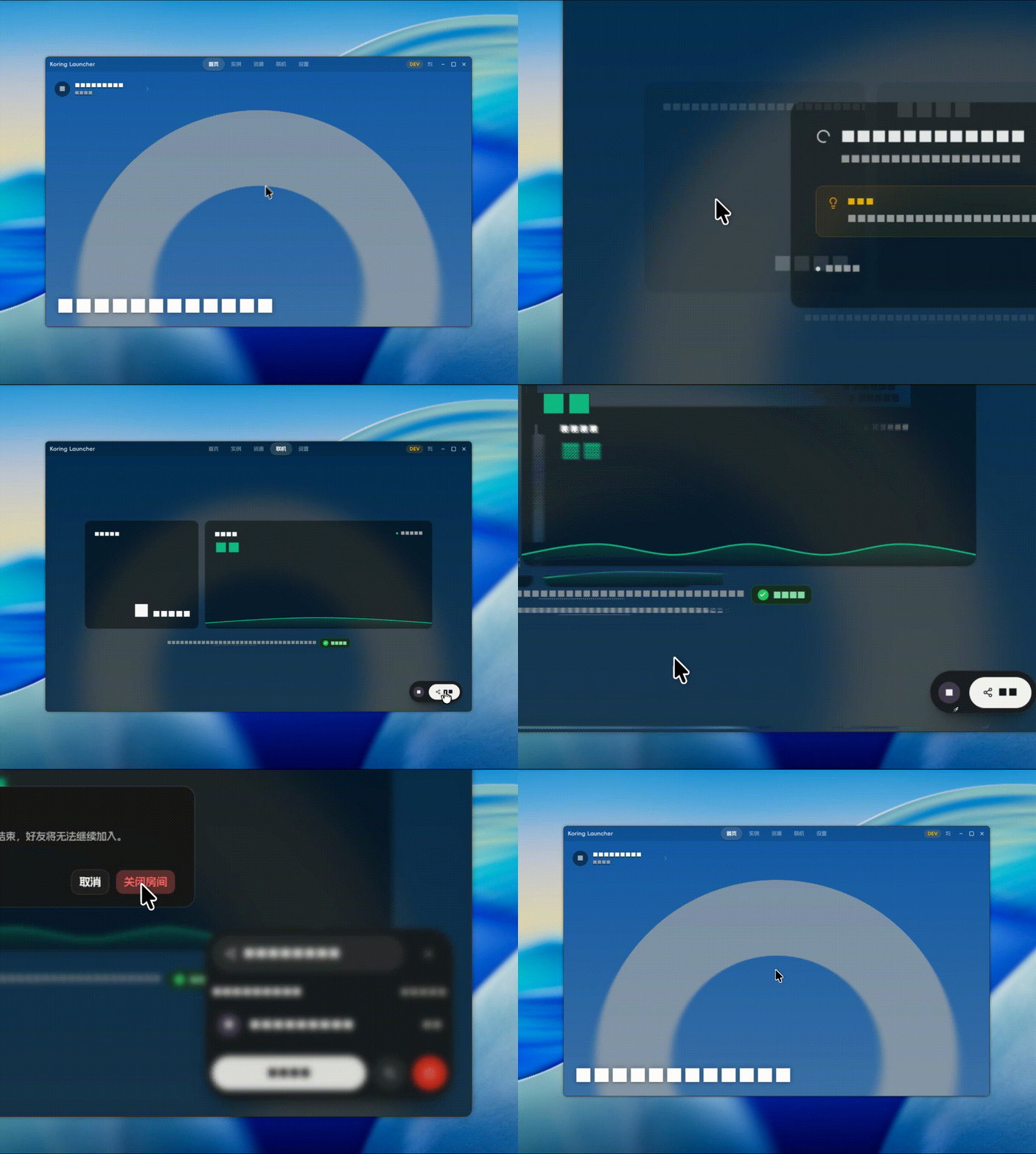
- 联机页:陶瓦联机(Terracotta)已实装 —— 打包内置上游未修改二进制、经主进程 HTTP API 连接;以太联机仍为占位;
- 账号入口:微软正版登录与 Koring 账户的界面入口待开放;
- 多语言:语言偏好已支持简体中文 / English,界面文案正在逐步外置;
- 整合包:整合包安装与导出、模组依赖检查与更新检测;
- 实例增强:存档导入导出、版本复制、创建快捷方式;
- 发布完善:macOS 签名与公证、Windows 生产证书;
- 崩溃分析:云端原因库与多日志级联分析。
反馈与贡献
- 问题反馈:可在启动器「设置 → 服务与反馈」中打开在线反馈表单(YouTrack 表单),或在仓库提交 Issue。
- 参与开发:欢迎 Fork 仓库并基于
master提交 Pull Request。开发环境、构建方式与仓库约定请阅读 DEV.md 与 AGENTS.md。 - 打包依赖:
pnpm dist:*会先执行pnpm fetch:terracotta,从上游 GitHub Release 预取陶瓦联机二进制到build/terracotta/并随安装包复制为resources/terracotta/(失败仅警告、不阻断构建,可在应用内重新下载)。 - 提交信息建议使用约定式(
feat:/fix:/docs:/refactor:…)。
许可证
本项目使用自定义 LingkeLice 1.0(LL-1.0) 许可证,版权归 Shenzhen Lingke Network Technology Co., Ltd.(深圳瓴克网络科技有限公司) 所有。
要点:非商业用途可自由使用、复制、修改与分发(含并入其他项目);任何 商业用途(含集成进商业产品、商业化提供服务、直接 / 间接获利)须事先获得版权所有者的书面授权。详见 LICENSE。
商业授权请联系 Shenzhen Lingke Network Technology Co., Ltd.(深圳瓴克网络科技有限公司)。
English Version
- Introduction
- Features
- Screenshots
- Download & Install
- Getting Started
- Update Channels
- Status & Roadmap
- Feedback & Contributing
- License
Introduction
Koring Launcher is a modern Minecraft launcher for Windows, macOS and Linux. Its goal is to make the basics effortless: install it, launch it, and understand what went wrong when something breaks.
Games are organized as instances. Each instance can use its own Minecraft version, mod loader and mods, so you can switch between setups and configure them independently. Before launching, the launcher verifies that the version files and dependencies are complete and offers one-click repair — instead of starting a half-installed game.
The interface uses a frameless window, glass-inspired surfaces, a dedicated splash screen, directional page transitions and light/dark themes. The launcher also ships with dual-channel auto-update, device verification, version activation, runtime notices, crash analysis, a task queue and an in-app feedback entry.
Status: the mainline release is 1.2.7, with Windows, macOS and Linux packages built and published through GitHub Actions. Launching, instance management, crash analysis, news, settings and auto-update are available. The resource center, online play and some account entries are still in progress — see Status & Roadmap.
Features
Launching
- One-click launch from the home page; the home title and play button follow the instance selected on the instance page.
- Launchability check for the version manifest, client JAR and libraries, with clear errors and one-click repair instead of starting an incomplete instance.
- Automatic Java matching based on the Minecraft version, plus manual Java paths, Java scanning, initial/max memory, GC and extra JVM arguments.
- Centralized launch options: game window size, quick-connect server, IP stack preference, game arguments, pre-launch commands and post-launch launcher behavior.
- A visible task queue for installs, repairs and downloads, with progress, phase counters, logs, pause/resume/cancel/retry and removal.
Instance management
- Multiple game directories with custom display names and ordering.
- New-instance wizard: Minecraft version, loader (Forge / NeoForge / Fabric / Quilt / OptiFine), install location and memory, with an option to download immediately.
- Import an existing game folder; playable versions are discovered and imported in bulk, skipping ones already added.
- Instance detail with seven tabs: overview, settings, mods, saves, screenshots, resource packs and logs.
- Local content management: enable/disable/delete mods with search and filters; browse, back up or delete saves; preview and delete screenshots; inspect resource and shader packs.
- Instance health check and one-click repair of vanilla files, loaders and libraries.
- PCL2-style version isolation (Settings → Game): per-instance, per-version or none, deciding where mods, saves and config live; switching never moves existing files.
- Favorites, plus a clear separation: the instance page selects a version, the home page launches it.
Crash analysis
- The logs tab analyzes crash reports and the latest log, presenting a conclusion, evidence, suggestions, environment information and the log tail.
- More than twenty rules cover out-of-memory, wrong Java version, mod conflicts, missing dependencies, Mixin failures, loader errors, OpenGL / GPU driver issues, file verification and permission problems.
- A fallback recommendation is shown when no rule matches.
Install & download
- Vanilla, Forge, NeoForge, Fabric, Quilt and OptiFine installations and repairs.
- Three download sources: BMCLAPI mirror, Mojang official and custom mirror, with configurable concurrency and a preview of the effective URLs.
- Download source changes take effect immediately.
Accounts & safety
- Offline accounts with spec-compliant UUIDs and LittleSkin accounts. Koring account QR sign-in and Microsoft sign-in are integrated, but their UI entries are currently hidden while being finished.
- Device registration and verification on first launch and after updates, with a dedicated blocked page for abnormal devices.
- Version activation, forced upgrades and runtime notices delivered by the service.
- Optional third-party authentication endpoint, plus a hardware-based device ID shown on the About page.
News
- Official Minecraft news feed with platform filters (Java, Bedrock, Dungeons, Legends), infinite scrolling, manual refresh and links to the original articles.
Desktop experience
- Frameless window, custom glass title bar and window controls, light/dark themes.
- Dedicated splash screen and directional page transitions; version cards feature an animated silk effect.
- Backgrounds support colors, gradients, images, blur, opacity and parallax.
- Accessibility options for reduced motion, reduced transparency and high contrast.
- Flexible settings center covering game, accounts, Java, directories, advanced options, theme, UI, language, downloads, online play, security, feedback and more.
- First-run OOBE and post-update UPVP flows, with categorized release notes.
Screenshots
<!-- e.g. <img src="docs/screenshots/home.png" width="720" alt="Home" /> -->Coming soon — contributions welcome: drop screenshots into
docs/screenshots/and reference them here.
Download & Install
Get the latest package from GitHub Releases:
| Platform | Package | Notes |
|---|---|---|
| Windows | NSIS installer | Custom install directory, desktop and Start Menu shortcuts |
| macOS | DMG / ZIP | Apple Silicon and Intel builds |
| Linux | AppImage | Make it executable and run |
Requirements
- Windows 10 / 11 (x64)
- macOS (Apple Silicon and Intel)
- A mainstream x64 Linux desktop
A working Java runtime is required to play. The launcher matches and validates it automatically, and you can also point it at a specific Java manually.
Windows installers use remote signing (currently a test certificate), so some systems may still show an “unknown publisher” warning. macOS builds are not yet signed; if Gatekeeper blocks the first launch, allow it in System Settings → Privacy & Security, or right-click and choose Open.
Configuration, account data and crash logs live in the user data directory
(%APPDATA%\Koring Launcher on Windows), not in the install directory, so upgrades
and reinstalls keep your setup.
Getting Started
- Install and complete the OOBE: language, agreements, device and version checks.
- Confirm your game directory, or add your own
.minecraftfolder. - Create an instance in the instance page, or import an existing game folder.
- Select the instance to play; run a health check and repair if needed.
- Return home and press Play. Progress is visible in the task queue.
- Adjust Java, memory, download source, post-launch behavior, theme and accessibility as needed.
Update Channels
Two channels are available under Settings → About:
| Channel | Description |
|---|---|
| Woker (steady) | Stable releases only — recommended for daily play |
| Runner (preview) | Also receives beta builds — for users who want early access |
The update page shows release notes, supports checking and downloading updates (with progress, pause/resume/cancel) and installing with a restart. Downloaded packages are verified before installation. Forced upgrades and blocked versions are communicated explicitly and routed to the update page.
Status & Roadmap
Available
- Home launch, pre-launch verification and one-click repair;
- Multi-directory instances with create/import/check/repair;
- Mods, saves, screenshots, resource packs and logs per instance;
- Crash analysis, official Minecraft news and the task queue;
- Offline and LittleSkin accounts, device verification and version activation;
- Settings center, personalization and accessibility;
- OOBE / UPVP onboarding, dual-channel auto-update and runtime notices;
- Windows, macOS and Linux build & release pipelines.
In progress
- Resource center entry: the browsing and installation UI for Minecraft versions, mods and modpacks is largely implemented but not yet exposed in stable builds (modpack installation is still in progress);
- Online play: Tawa (Terracotta) online play is implemented — the upstream binary is bundled unmodified and driven over its HTTP API by the main process; Ether remains a placeholder;
- Account entries: Microsoft and Koring account UI entries are pending;
- Localization: Simplified Chinese / English preference exists; UI strings are being externalized;
- Modpacks: install/export, mod dependency checks and update detection;
- Instance extras: save import/export, version copy and shortcuts;
- Release polish: macOS signing/notarization and a Windows production certificate;
- Crash analysis: cloud-based cause library and multi-log correlation.
Feedback & Contributing
- Use the in-app feedback form under Settings → Service & Feedback (YouTrack form), or open an issue.
- Contributions are welcome: fork the repository and branch from
master. See DEV.md and AGENTS.md for development and repository conventions. Conventional commit messages are preferred. - Packaging dependency:
pnpm dist:*first runspnpm fetch:terracotta, which prefetches the Tawa (Terracotta) binary from the upstream GitHub Release intobuild/terracotta/; electron-builder copies it toresources/terracotta/(a failure only warns and does not block the build; the app can re-download it).
License
This project is licensed under the custom LingkeLice 1.0 (LL-1.0), © Shenzhen Lingke Network Technology Co., Ltd. In short: non-commercial use (use, copy, modify, distribute, including incorporation into other projects) is free; any commercial use — integrating into commercial products, providing paid services, or earning direct/indirect revenue — requires prior written authorization from the copyright holder. See LICENSE.
For commercial licensing, contact Shenzhen Lingke Network Technology Co., Ltd.